Postponing and cancelling an event
How do I handle the cancellation or postponement of an event?
There are several scenarios you can follow when an event is cancelled or postponed. Below are some possible approaches.
Postponed performance
If a replacement date for an event exists, you can simply change the date in the event’s basic details. The attendee can re-download and print their tickets via the previously received email, and will then have tickets with the correct new date. Barcodes remain valid.
If you would like to resend the e-tickets (with the correct date) to the visitors, you can send a new delivery email in bulk.
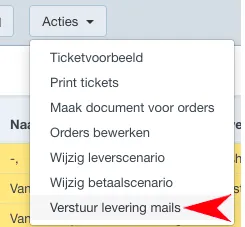
In the Orders tab, it is possible to (re)send a delivery email for a selection of orders. To do this, select the orders from the list, then use Actions and choose Send delivery mails.
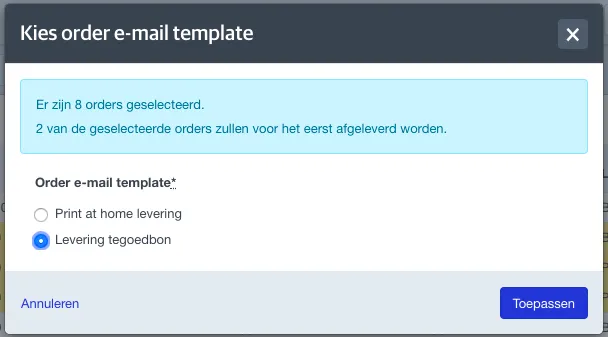
In the next screen, you select which order email to send. Only order emails of the delivery type are shown in this list.
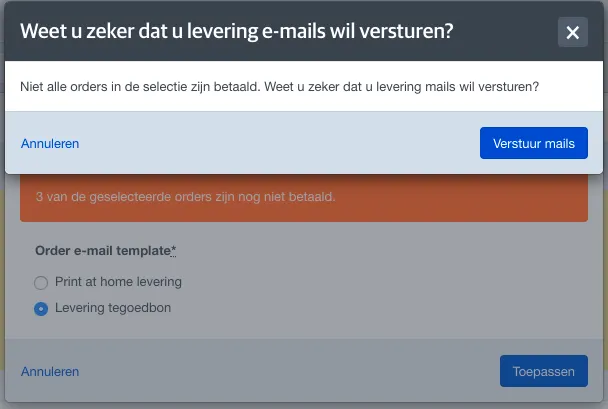
If there are unpaid orders in your selection, the system will warn you.
If a download link to the tickets is included in this order email, it is important that the orders in your selection have a delivery scenario that allows e-tickets. You can check this in the delivery scenario settings. If any of the orders do not allow e-tickets, the download link will not work.
To ensure that everyone can download their tickets, you must first change the delivery scenario for your selection. The necessary instructions for editing delivery scenarios in bulk can be found here here.
Cancelled event
If the event is definitively cancelled, there are several ways to process visitors’ tickets.
Voucher
You can offer the visitor a voucher to book new tickets for another event at your venue. It is advisable to use a specific voucher for this purpose. More information about using a voucher can be found here.
Donation
The visitor can choose to donate the paid amount to the organisation. To process this donation quickly for administrative purposes, you can create a new order fee. The amount can then be booked on this specific order fee from the order and counted as a donation to your venue.
Refund
More information about refunds can be found here.
Informing ticket buyers about the status of the performance
From ticketmatic you can send service emails. You can do this via the Public module or via the service emails in settings. For example, this allows you to share information about any rescheduling or cancellation with your visitors. Send the service email before removing tickets from orders.